
Magic Moments SDK: A Developer’s Guide to Building Post-Call Actions for Apps Worldwide
Turn phone conversations into meaningful digital experiences with the Magic Moments SDK.
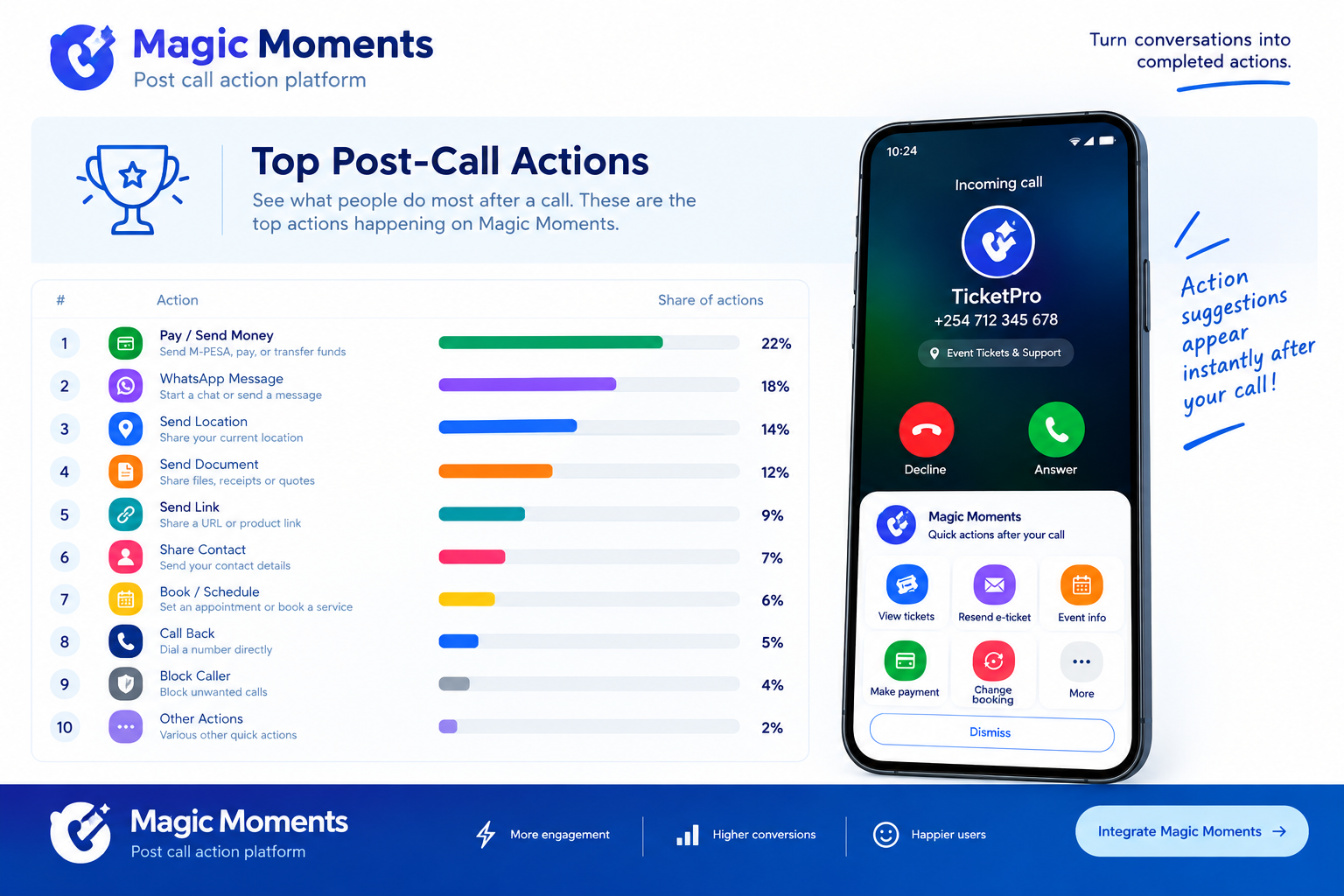
Every day, millions of people contact businesses through phone calls to ask questions, make payments, book services, resolve problems, or receive support. Yet when a call ends, the customer often has to open an application, search for the relevant service, authenticate, and repeat steps they have already discussed with a customer care representative.
For developers building mobile applications, this creates an opportunity to connect phone conversations with the next digital action.
Magic Moments is designed to bridge that gap. By enabling relevant actions after a call, it can help developers connect customer conversations with existing app experiences, making it easier for users to complete tasks without unnecessarily navigating through multiple screens.
Whether you are building a fintech application, insurance platform, ticketing solution, marketplace, mobility service, or customer support application, this guide explores the opportunities, integration considerations, and potential benefits of adopting the Magic Moments SDK.
1. What Are Post-Call Actions?
Post-call actions are contextual digital actions presented to a user after a phone call, helping them continue a task related to the conversation.
For example, a customer calls an insurance company to ask about a motor insurance policy. Once the conversation ends, the customer could be presented with options to:
- View their insurance policy.
- Download a certificate of insurance.
- Make a premium payment.
- Start a claim.
- Update personal details.
- Contact customer support through another channel.
Instead of asking customers to remember every instruction from the call, the application can help them move directly to the appropriate next step.
The same principle applies to other industries. A customer who calls a ticketing company could access tickets, resend an e-ticket, or review event details. Someone speaking to a bank could be directed to an appropriate payment or account-management screen.
The key idea is simple: the end of a phone call can become the beginning of a digital interaction.
2. Introducing Magic Moments for Developers
Magic Moments is a post-call action platform designed to help existing applications connect phone-call events with relevant digital actions.
Rather than requiring businesses to build an entirely new customer application, the platform is intended to complement their existing digital infrastructure.
Developers can use the integration approach to connect relevant events with configured actions that direct customers into the appropriate application experience.
The concept centres on several components:
Event detection: Identify an eligible call-ending event or supported partner event.
Trigger and rules engine: Determine whether a configured condition is met and which action should be offered.
Action orchestration: Present a relevant action or direct the user towards the appropriate app destination.
Application integration: Allow the customer to continue within the partner's existing app, using its established authentication, business logic, and workflows.
Analytics: Measure the action journey, where supported, from eligible events and displayed actions to clicks, app openings, and completed activities.
The exact integration capabilities depend on the SDK version, operating system, device permissions, and the partner application's implementation. Developers should validate these requirements before committing to a production deployment.
3. How the Post-Call Experience Works
A typical post-call journey can be understood as a sequence of events.
Step 1: A customer makes or receives a call
A customer speaks with a business representative or contacts a business through a supported calling workflow.
For example, a customer calls a bank to enquire about a payment, contacts an insurer about a claim, or speaks to an event organiser about a ticket.
Step 2: An eligible event occurs
After the call ends, a supported event can initiate the post-call experience.
The available event signals vary across platforms and configurations. Developers must account for operating-system restrictions and ensure that any required permissions and disclosures are handled appropriately.
Step 3: The platform evaluates configured rules
The trigger engine evaluates the relevant conditions to determine whether a post-call action should be presented.
Rules might depend on the event type, a configured business workflow, or other permitted contextual information. The implementation should avoid assuming that the platform automatically understands the conversation or knows everything discussed during the call.
Step 4: Relevant actions become available
The user sees a suitable set of actions, such as viewing an account, checking a booking, accessing documents, or contacting support.
The actions should be specific, useful, and limited to what the application can actually deliver.
Step 5: The customer continues in the existing application
Selecting an action can take the user to the appropriate destination in the partner application, subject to the integration design.
The partner application remains responsible for its authentication, permissions, business rules, transactions, and final processing.
Step 6: The business measures results
Where analytics are implemented, the business can measure how customers move through the action funnel and identify opportunities to improve completion rates.
This helps developers and product teams evaluate whether post-call actions are generating meaningful outcomes rather than simply displaying another interface.
4. Why Developers Should Consider Post-Call Actions
Developers are increasingly expected to deliver convenient, context-aware experiences. However, improving an application's user journey does not always require rebuilding the entire application.
Post-call actions offer several potential advantages.
Reduce friction in customer journeys
Customers may finish a call knowing what they need to do but not knowing where to find the relevant feature in an application.
A contextual action can reduce the number of steps between the conversation and the task.
Improve engagement with existing features
Businesses invest in features such as document downloads, payments, booking management, claims, and account updates. Yet customers may not discover or use these features consistently.
Presenting a relevant action at the right moment can help customers find functionality already available to them.
Extend the value of existing applications
Developers can explore new ways to activate their existing application features without creating a separate application for every customer interaction.
This is especially useful when a business already has established digital workflows and wants to connect them to customer service conversations.
Support measurable experimentation
Teams can test different actions, improve the wording and placement of prompts, and assess which experiences lead to completed tasks.
The business value should ultimately be measured through meaningful outcomes, not merely the number of post-call screens displayed.
5. Use Cases Across Industries
Magic Moments is relevant to a wide range of digital products. The best starting point is an industry where phone calls frequently lead to an identifiable next action.
Financial services and fintech
Financial service providers regularly handle enquiries about accounts, payments, cards, loans, and customer onboarding.
Possible post-call actions include:
- Open the relevant account screen.
- Continue a supported payment workflow.
- Review transaction information.
- Update customer details.
- Access support or relevant documents.
Sensitive financial actions must remain protected by the institution's authentication, authorisation, and transaction controls. A post-call prompt should never bypass those safeguards.
Insurance
Insurance conversations often involve specific tasks that customers need to complete afterwards.
Possible actions include viewing policy documents, starting a claim, checking claim progress, making a premium payment, or setting a renewal reminder.
These actions can help customers move from receiving information over the phone to managing their insurance digitally.
Ticketing and events
Ticketing companies can use post-call actions to connect support conversations with ticket-related workflows.
For example, customers could view their tickets, resend an e-ticket, check event details, review a booking, or contact support.
This can be particularly valuable when a customer needs assistance shortly before an event.
Marketplaces and e-commerce
Customers may call a marketplace about an order, a delivery, a return, a seller, or a product.
Potential actions include viewing an order, checking delivery status, accessing return instructions, contacting a seller, or reviewing a product.
The marketplace can use its existing app functionality to handle the actual transaction or workflow.
Mobility and car rental
Mobility platforms and car rental businesses can connect support calls with booking information, rental instructions, vehicle details, payment workflows, or customer assistance.
For example, a customer who calls about a booking could be directed to the relevant reservation screen rather than being required to search manually.
These are illustrative use cases; the appropriate actions depend on the partner's existing product capabilities and the integration supported.
6. Integration Considerations for Developers
Before integrating any post-call SDK, technical teams should assess the following areas.
Platform compatibility
Confirm which operating systems, device versions, and event sources are supported by the SDK.
Call-related events are subject to platform restrictions. Do not assume that every application can observe every call event on every device.
Permissions and user experience
Identify the permissions required and explain their purpose clearly to users. The integration should respect platform policies, user choices, and applicable privacy requirements.
Deep links and app destinations
Map each post-call action to a valid destination within the partner application. Test behaviour when the app is installed, when it needs to be opened, and when the user must authenticate.
Authentication and authorisation
The partner app should validate the user's identity and permissions before exposing private information or performing a sensitive action.
A post-call action is an entry point, not a substitute for application security.
Reliability and error handling
Plan for cases where an event is unavailable, an app destination cannot be opened, the network is disconnected, or an action fails.
Provide a safe fallback that helps the customer continue without losing context.
Analytics and testing
Define the events that matter to the business. Depending on the implementation, these may include eligible events, actions displayed, clicks, application openings, and completed workflows.
Use test scenarios that reflect real devices, supported operating-system versions, permissions, and network conditions.
7. Privacy, Security, and Responsible Design
Post-call experiences must be designed around customer trust.
A post-call action does not inherently require access to the audio of a conversation or a transcript of what was said. Developers should start with the minimum information necessary to trigger and deliver the intended experience.
Important considerations include:
- Collect only the data required for the stated purpose.
- Explain relevant data collection and processing to users.
- Obtain permissions and consent where required.
- Protect credentials, tokens, and sensitive information.
- Apply suitable access controls and retention policies.
- Keep sensitive transactions inside the partner application's established security controls.
- Review applicable privacy laws, platform policies, and contractual obligations in every target market.
For applications operating internationally, compliance cannot be treated as a single global checkbox. Privacy, telecommunications, consumer-protection, and data-handling requirements may differ between jurisdictions.
Developers should review the requirements that apply to their product and deployment locations before launching.
8. Building for a Global Audience
The opportunity for post-call actions extends beyond one country or industry. However, a global product needs to accommodate differences in devices, languages, customer expectations, and business processes.
Consider the following principles.
Localisation: Translate action labels, instructions, dates, and other interface elements into the languages relevant to your users.
Regional workflows: Ensure actions reflect local payment methods, support channels, and service processes where applicable.
Device diversity: Test on the devices and operating-system versions your customers actually use.
Network conditions: Design for interrupted connections and unreliable mobile networks.
Accessibility: Make actions understandable, readable, and usable by people with different accessibility needs.
Regional compliance: Review privacy and platform requirements before expanding into a new market.
A globally useful SDK should make it easier to integrate a consistent concept while allowing each partner application to retain the flexibility needed for its own market.
9. Measure the Outcomes That Matter
An integration should be evaluated by whether it helps users complete useful tasks.
A practical measurement framework can follow this funnel:
- Eligible events: How many supported events qualified for the experience?
- Actions displayed: How often was a post-call action successfully shown?
- Action clicks: How many users selected an action?
- Application openings: How many users reached the intended app destination?
- Completed actions: How many users finished the target workflow?
These measures help teams identify where customers drop off. For example, strong click-through rates but low completion rates may indicate a problem with the destination screen, authentication flow, or task itself.
Use appropriate aggregation, privacy safeguards, and retention limits when analysing performance. Define success metrics before the pilot begins so that the results can guide product decisions.
10. Start Small, Validate, and Expand
The most effective way to evaluate a new integration is to begin with a focused use case.
Choose one customer segment, one clear problem, and a small number of useful actions. Confirm the technical requirements, define the expected customer journey, and establish baseline metrics.
Next, build and test the integration in a controlled environment. Validate permissions, event availability, deep links, security, error handling, and analytics before moving to a live pilot.
Once the pilot produces reliable evidence, expand gradually to additional workflows or customer segments.
Avoid building a large collection of actions before establishing which ones customers need and which ones the business can support effectively.
Conclusion: Turn the End of a Call Into the Start of an Action
Phone conversations remain an important part of customer service across the world. Yet many digital journeys become fragmented as soon as a call ends.
For developers, Magic Moments offers an approach to connecting eligible call events with relevant actions in existing applications. From financial services and insurance to ticketing, marketplaces, and mobility, the opportunity is to help customers move from conversation to completion with less friction.
The strongest implementations will combine relevant actions, secure application workflows, responsible data handling, platform-aware engineering, and measurable outcomes.
If you are building a mobile application and want to explore post-call experiences, consider where a customer typically needs to go after speaking with your team. Identify one useful next step, validate that it can be supported on your target platforms, and test whether making that step easier improves the customer journey.
Magic Moments: Turn phone calls into digital actions.
Explore the concept and integration opportunity at Magic Moments by Spannovate.
Developer note: Confirm current SDK availability, supported platforms, API specifications, and integration instructions with the Magic Moments team before implementation; this article describes the product concept and integration considerations rather than guaranteeing specific SDK methods or capabilities.Talk to us through dev@spannovate.com